Coin Value Checker
- 4.5
- Rating
- 100.00K
- Installs
- Free
- Price
 Analysis by App-foxy
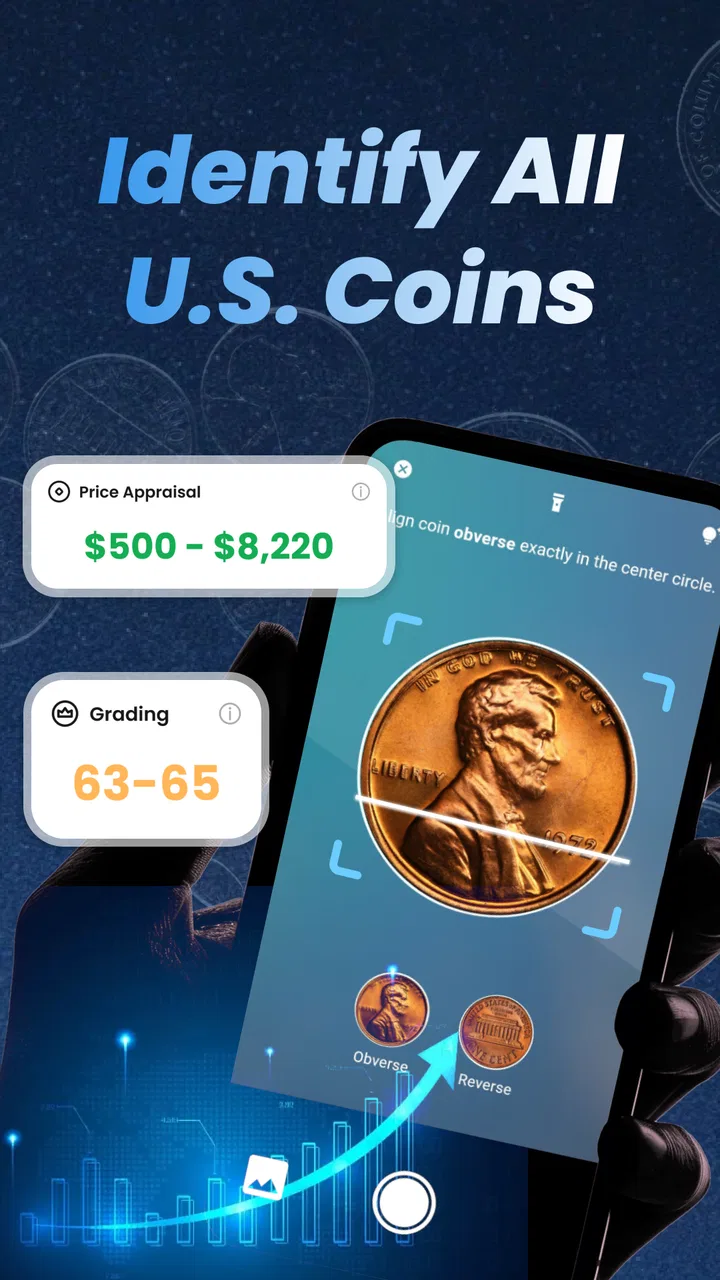
I found Coin Value Checker most useful when I treated it as a quick research companion rather than a final authority on every coin I handled. The Business app from CoinValueChecker uses a phone camera to help identify coins, estimate value, recognize grading details, and flag possible errors. That combination makes it appealing to casual collectors, people sorting inherited change, and anyone who wants a faster first look before searching through specialist references.
My first impression was that its real strength is convenience. Instead of typing a long description of a coin, I can place it in view, take a photo, and let the app turn a vague question into a starting point. The free download lowers the barrier to trying it, although in-app purchases range from $0.99 to $39.99 per item, so I would pay attention to which tools or limits matter to me before spending anything.
How I use Coin Value Checker from the first photo to a useful result
The most reliable workflow begins before opening the camera. I put the coin on a plain, reasonably bright surface and make sure the important details are visible: the date, lettering, portrait, mint mark, edge, and any unusual damage. A busy background or strong reflection can make a normal coin look more unusual than it really is, so a few seconds of preparation often saves more time than repeatedly retaking a poor image.
You May Also Like

 Blood Strike: 2.5 Anniversary
Blood Strike’s Loadouts Turn Every Drop Into a Tactical Gamble
A close look at Blood Strike’s custom loadouts: how fast access to signature weapons reshapes its battle royale rhythm, rewards preparation, and narrows the gap between fights.

 Pandora - Music & Podcasts
Pandora’s Music Is Easy to Start, but Harder to Recover
Pandora’s strength is its low-effort path from a seed to a station. Its weak spot is how much confidence it asks you to place in connection, setup, and quiet recovery.

 8 Ball Pool
 Is Built on Rivalries, Rematches, and Routine
A close look at the rivalries, rematches, shared routines, and unanswered safety questions that turn a quick pool match into a persistent mobile community.

 Samsung Music
’s Quiet Strength Is Playing What You Already Own
Its reach comes less from spectacle than from dependable access to a personal library. That simplicity is both the app’s strongest retention engine and its ceiling.

 AccuWeather: Weather Radar
AccuWeather Review: A Quick, Clear Forecast for Everyday Decisions
For everyday plans, the best forecast is the one you can understand quickly. AccuWeather makes rain timing, radar, and local conditions easy to act on, with a few trade-offs.

 Hill Climb Racing
Why Hill Climb Racing Still Turns Crashes Into One More Run
A tiny car, a bumpy hill and one more upgrade: Hill Climb Racing keeps resurfacing because its simple chaos makes every near-miss feel personal.
More From Our News Desk
View All News


I usually photograph both sides rather than relying on one view. A single face may suggest a country or denomination, but the reverse can confirm the type and reveal details that affect a possible valuation. If the edge has lettering, reeding, or an unusual shape, I also inspect it separately. This is especially important when checking for errors, because a mark that looks significant from the front may simply be ordinary wear or a reflection.
After the scan, I read the result as an organized shortlist of possibilities. The identification can help me understand what I am holding, while the value and grade information give me a rough direction for further checking. I would not treat the first number as a guaranteed selling price. Coin value depends on authenticity, condition, demand, rarity, and the difference between an attractive example and one with a formally verified grade.
That distinction is easy to miss if you are new to collecting. A camera-based estimate is useful because it narrows the field, but it cannot replace close inspection by an experienced person when the coin may be rare or valuable. I use the result to decide what deserves more attention, not to make an immediate buying or selling decision.
A practical household example
Imagine finding a small box of coins while clearing a relative’s desk. I would first separate the coins by country and broad type, then photograph the more interesting pieces one at a time. Coin Value Checker can make that initial sorting less tedious, particularly when the inscriptions are unfamiliar or the coins are mixed together. I would record the app’s suggestions beside the date and visible condition, then compare the strongest candidates with a reputable catalog or a local specialist.
This workflow is more useful than photographing an entire handful at once. Individual coins give the camera a cleaner subject, and they create a traceable collection of notes. If the app suggests an error, I would take a second image under softer light and compare the same area with a normal example. That simple repeatable habit helps separate a genuine design difference from dirt, scratches, glare, or ordinary striking variation.
The digital collection feature adds another practical layer. I can use it as a working inventory while sorting, rather than keeping every observation in scattered phone notes. For a growing collection, I would still maintain a backup record with the coin’s date, denomination, country, and physical condition. The app is convenient for organizing a first pass, but a collector who owns important pieces should avoid depending on a single digital record.
Settings and preparation that make the camera more dependable
There is no magic setting that turns a difficult coin into a perfect scan, so I focus on controllable conditions. I clean the camera lens, avoid direct flash when it creates a bright hotspot, and move the phone instead of zooming aggressively. The goal is a sharp image with readable lettering, not a dramatic close-up. If the coin is reflective, changing the angle of the light usually helps more than increasing brightness.
I also check the app’s available options before starting a large sorting session. If the interface offers choices for collection organization, image capture, or result presentation, I set them once and keep the same routine for similar coins. Consistency matters because it makes later comparisons easier. I do not change several things at once when a result looks wrong; I retake the image with one improvement, such as a plainer background or a different angle.
The minimum operating system is Android 7.0, which keeps the app accessible on a range of devices. Even so, the quality of the phone camera and the available light can affect the experience more than the age of the operating system. Someone using an older handset should test a few ordinary coins before committing to a long cataloging project. If text remains blurry in normal indoor light, the limitation may be the camera rather than the app.
Because the content rating is Everyone, the app is approachable for families and younger users who are learning about coins with an adult. I would still make the activity educational: ask the child to identify the country, date, and visible design before accepting the automated suggestion. That turns the scan into a lesson in observation instead of a button that produces an unexplained answer.
Faster patterns for sorting many coins
Speed comes from reducing repeated decisions. I prepare a small area for photography, keep similar coins together, and scan the clearest examples first. Once I understand how the app presents a particular series, I can move through the rest more quickly. I do not spend equal time on every coin: common, worn pieces get a basic record, while unusual dates, sharp details, or suspected errors receive a closer second look.
A useful shortcut is to create a priority queue in the digital collection. I mark or group coins that need verification, then continue sorting instead of interrupting the session to investigate every suggestion. Later, I return to that smaller group with better lighting and a reference source. This prevents one ambiguous coin from slowing down an entire box.
I also compare the app’s grading impression with visible evidence. Look at the high points of the design, the sharpness of lettering, the presence of scratches, and whether the original surface appears intact. If the result seems generous, I keep the lower personal estimate until another source supports it. This habit is valuable because automated grading can encourage beginners to confuse cleanliness or shine with genuine preservation.
For suspected errors, I use a repeatable three-step check. First, photograph the unusual area again without changing the coin. Second, rotate the coin and alter the light to see whether the feature remains consistent. Third, compare it with a normal example of the same design. A doubled-looking letter, off-center appearance, or strange mark deserves attention only when it survives those checks. The app can help point to the area; it cannot make the comparison unnecessary.
Another time-saving habit is to photograph the reverse immediately after the obverse, before moving the coin. That keeps the pair together in my notes and reduces the chance of mixing similar pieces. When I later review the collection, the identification, condition impression, and possible error all belong to the same physical coin rather than to two nearly identical entries.
Where the app helps more than ordinary alternatives
The usual alternative is a general web search. That approach can be excellent when I already know the country, denomination, and date, but it becomes frustrating when the inscription is unfamiliar or the coin is damaged. Coin Value Checker gives me a visual first step, which is faster for a mixed pile and more natural for someone who cannot describe the object accurately.
A printed catalog or specialist database remains better for careful research. Those resources encourage comparison with known varieties, historical context, and market evidence, while the app is better at reducing the initial uncertainty. I see the two methods as complementary: use the camera to narrow the possibilities, then use a trusted reference to test the interesting ones.
A professional dealer or grading service is the stronger option when the financial stakes are high. If I were considering a purchase based on a rare-error claim, I would want independent inspection rather than relying on a phone result. The app is most valuable before that stage, helping me decide which coins justify the time and expense of expert attention.
Compared with keeping a manual spreadsheet, the collection feature is more immediate because the coin begins with an image and an app-generated description. A spreadsheet is still more flexible for custom fields, purchase history, costs, and sales records. Serious collectors may reasonably use both: Coin Value Checker for visual intake and a separate record for long-term financial or provenance details.
Limits that experienced users should keep in mind
The biggest limitation is the gap between recognition and authentication. A convincing result does not prove that a coin is genuine, and an unusual-looking coin is not automatically a valuable error. Counterfeits, altered dates, cleaned surfaces, and lighting artifacts can all mislead a visual workflow. I would never use the app alone to set a price for a rare coin or to reassure myself that an expensive purchase is safe.
Condition is another area where caution pays off. Grading has fine distinctions, and two coins with the same design can have very different values because of surface marks, strike quality, luster, and wear. A phone image compresses those details. I find the grade feature useful as a conversation starter and sorting aid, but not as a substitute for established grading standards.
There is also a practical trade-off in the purchase model. The app is free to install, which makes experimentation easy, but optional items can cost from $0.99 to $39.99 each. Before using it as the foundation of a large collection, I would check which parts of my intended workflow require payment and whether the benefit is worth it for the volume of coins I actually handle. A casual user may never need more than an occasional scan, while a dedicated collector should understand the cost of repeated use.
The app may also be the wrong choice for someone who wants a complete numismatic research system. If my main goal were die varieties, auction history, detailed provenance, or formal valuation, I would choose specialist references and expert communities first. Coin Value Checker fits the discovery and organization stage better than the final verification stage.
Who will get the most from it
I would recommend it to beginners who want a friendly way to explore coins without learning catalog terminology first. It is also handy for families, estate sorting, flea-market curiosity, and collectors who need to process an unsorted group before doing deeper research. The combination of image-based identification, grading guidance, error checking, and a digital collection gives those users a clear next action after each scan.
It is less suitable for someone expecting every estimate to be exact or every unusual mark to be a valuable discovery. Experienced collectors may appreciate the speed, but they will probably use it as a secondary tool because their own references and inspection habits provide more depth. That is not a failure; it is a sensible division of labor between a convenient camera assistant and specialist knowledge.
The app has built a respectable audience, with an average rating of 4.4 from around two thousand ratings and over one hundred thousand installs. Those figures suggest that many people find the basic idea useful, but they do not remove the need for careful handling of results. I would judge it by whether it improves my sorting process, not by the rating alone.
My verdict after building a repeatable routine
Coin Value Checker works best when I give it a defined job: identify a coin, suggest where to look more closely, and keep the first-stage collection organized. Its strongest advantage is the short path from an unknown coin to a workable research lead. The most valuable habit is to pair every interesting result with a better photograph, a comparison coin, and an independent reference.
The current version is 1.3.0, and the app’s free entry point makes it easy to test that workflow for yourself. I would begin with ordinary coins rather than valuable ones, learn how lighting affects the results, and only then decide whether optional purchases add enough value to my collection process.
My bottom line: Coin Value Checker is a useful first-pass tool for visual coin identification and digital organizing, especially when a mixed pile feels overwhelming. I recommend it to curious beginners and practical collectors who understand its limits. I would skip relying on it as the sole authority for authentication, formal grading, or high-stakes pricing, where specialist references and human expertise remain the safer choice.
FAQs for Coin Value Checker
01What is Coin Value Checker and how does it work?
Coin Value Checker is a mobile application designed to help users quickly and accurately assess the value of coins in their collection. By using the app, users can scan or manually input coin details, and the app will provide up-to-date market values, historical data, and other relevant information to help users make informed decisions.
02Is Coin Value Checker free to use or does it require a subscription?
Coin Value Checker offers a free version with basic features, allowing users to access essential coin valuation tools. However, for a more comprehensive experience, including advanced analytics and historical trends, a premium subscription is available. This subscription can be purchased on a monthly or annual basis for users who need in-depth coin appraisal services.
03What kind of coins can be evaluated using Coin Value Checker?
Coin Value Checker supports a wide range of coins from various countries and eras, including modern and historical coins. The app's extensive database covers coins from the United States, Europe, Asia, and more, making it a versatile tool for both novice and experienced collectors looking to assess the value of their diverse collections.
04How accurate are the valuations provided by Coin Value Checker?
The valuations provided by Coin Value Checker are based on a comprehensive database that is regularly updated with the latest market trends and auction results. While the app strives for accuracy, coin values can fluctuate due to market conditions. It is always recommended to cross-reference with other sources or consult with a professional for high-value or rare coins.
05Does Coin Value Checker require an internet connection to function?
While Coin Value Checker can perform basic functions offline, an internet connection is necessary to access the latest market data and valuation updates. This ensures that users receive the most current information available. For optimal performance and accuracy, it is recommended to use the app with a stable internet connection.
Pros
- User-friendly interface for quick access
- Supports multiple currencies and coins
- Real-time updates for accurate valuations
- Customizable notifications for alerts
- Secure with two-factor authentication
Cons
- Limited offline functionality
- Ads can be intrusive at times
- Requires internet for full features
- Occasional bugs in older devices
- Subscription needed for premium tools

Coin Value Checker
Gallery